
The features

Everything OLOsecurity can do.

From the firewall to recovery, tab by tab: OLOsecurity’s protections, all on your own server.
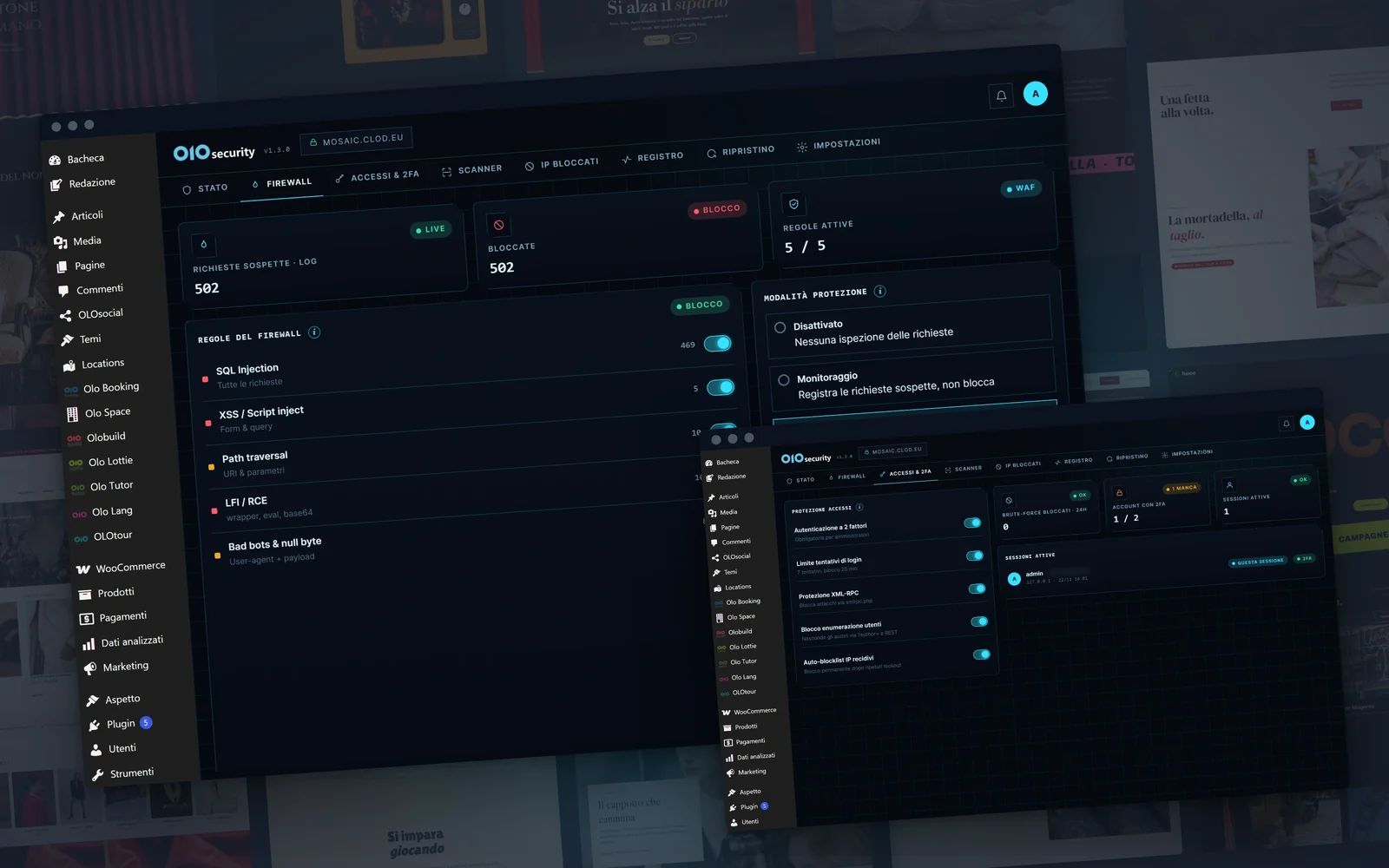
The OLOsecurity dashboard

Firewall

The OWASP rules, in watch or block mode.

IPs, countries and bots

IP lists, geo-blocking, fake crawlers.

Logins and 2FA

Limited attempts and two-step verification.

Passwords and CAPTCHA

Have I Been Pwned and reCAPTCHA.

Scanner

Core, plugins, webshells, malware, CVEs.

Guided recovery

Sessions, passwords, report and guide.

Log and alerts

Log, live traffic, notifications.

Hardening

Security headers and small reinforcements.

On your server

All local, GPL code, Plugin Check 0/0.

Firewall

A mini-WAF inside WordPress.

The firewall checks addresses, forms and cookies before the request reaches the website.

Five attack families

SQL injection, XSS, path traversal, LFI/RCE, bots and null bytes.

Three modes

Off, watch mode or block mode.

One group, one switch

You only turn on the families you need.

The /batch/v1 shield

Always on against the wp2shell hole.

Request limit

On the risky spots: xmlrpc, login, REST and author lookups.

Firewall

Watch first, then block.

Rules are switched on family by family. In Monitoring mode the firewall logs without stopping anyone; in Block mode it rejects suspicious requests.

Network

Who arrives from where.

Addresses known for attacks stay out, and you choose the countries.

IP reputation

Six public lists, updated every 6 hours, every 12 or once a day.

Geo-blocking

Block the countries you choose or let only those in, for IPv4 and IPv6.

Fake Googlebots and Bingbots

A DNS check unmasks anyone pretending to be a search engine.

Rules on User-Agent, Referrer and Hostname

To stop the visitors you recognise.

IP lists

Blocked and trusted, for whole networks too.

Logins

A password alone is not enough.

The login is the most sought-after door: OLOsecurity locks it twice.

Limited attempts

After five mistakes a quarter-hour wait, after two blocks the IP stays out.

Hidden usernames

No way to discover the administrators’ names.

Code from an app or by email

Two-step verification, with the QR code for the app.

Recovery codes

Single-use, for when your phone isn’t around.

Remember the browser

For 30 days, on the computers you trust.

Required for administrators

If you like, 2FA becomes mandatory for anyone who administers the website.

Passwords

Passwords already stolen, recognised.

A password that has already shown up in a data breach is like an open door.

Compromised passwords

The check with Have I Been Pwned: only the beginning of the fingerprint leaves.

Forced change or warning

You choose what happens.

reCAPTCHA v2 and v3

On login, registration and password recovery, with your own keys.

XML-RPC

You switch it off with one toggle.

Scanner

What shouldn’t be there.

A scan every day, and the deep one whenever you like.

Core integrity

A comparison with wordpress.org and the official file next to the changed one.

Plugins and themes

It flags the ones changed without an update.

Webshells

In uploads and mu-plugins, including double extensions.

Deep scan

The whole content folder, in batches, picking up where it left off.

Malware signatures and phishing

The open signatures from maldet and InterServer, and the links in your content.

Known vulnerabilities

From the public catalogue, with the “Update” button.

Other checks

.htaccess, orphan cron jobs, new administrators, exposed files, permissions, disk space.

PHP uploads blocked

A PHP file uploaded to the uploads folder is stopped straight away.

Recovery

After an attack, one step at a time.

The urgent actions with one click, the rest with a clear guide.

Close all sessions

Including the browsers trusted by two-step verification.

Passwords to change

At the next login, for the users you choose.

Application passwords

Revoked all at once.

Orphan cron jobs

The ones that no longer belong to anything are removed.

The guide for the rest

Core, plugins, themes, suspicious files and keys, step by step.

The incident report

A document to download and hand over.

Log

Who, what, when.

Every event stays on record for 90 days, and the important ones reach you straight away.

The log

Who did what, with browser, origin and address; you can filter and export it.

Live traffic

Requests as they arrive.

Emails and webhooks

Alerts on Slack, Discord and Mattermost too.

Summaries

Every week or every month, in your inbox.

Hardening

The side doors, closed.

The settings that close the most beaten paths.

Security headers

HSTS included, and CSP in watch mode.

Hidden version

Without disturbing the file cache.

File editor switched off

Nobody edits plugins and themes from the admin.

A protected folder

OLOsecurity only writes to its own uploads folder.

Settings

Every option has its own (i).

A single page, split by topic, with the explanation next to every option. A bar at the bottom reminds you of changes to save.

Privacy

No cloud, no account.

Your website’s traffic doesn’t go through any outside service.

All local

No cloud, no account, no telemetry.

Only what you turn on

IP lists, vulnerabilities and reCAPTCHA are switched on by choice.

GPL code

You can read it line by line.

WP Plugin Check 0/0

Zero errors and zero warnings.

14 languages

The admin speaks Italian and thirteen other languages.

Prices

Free, always included.

All these protections come with OLObuild, even in the free edition.