

Base manual
How OLOsecurity protects a WordPress website: the guided first launch, the defences, the scanner and recovery after an attack. All on your own server.
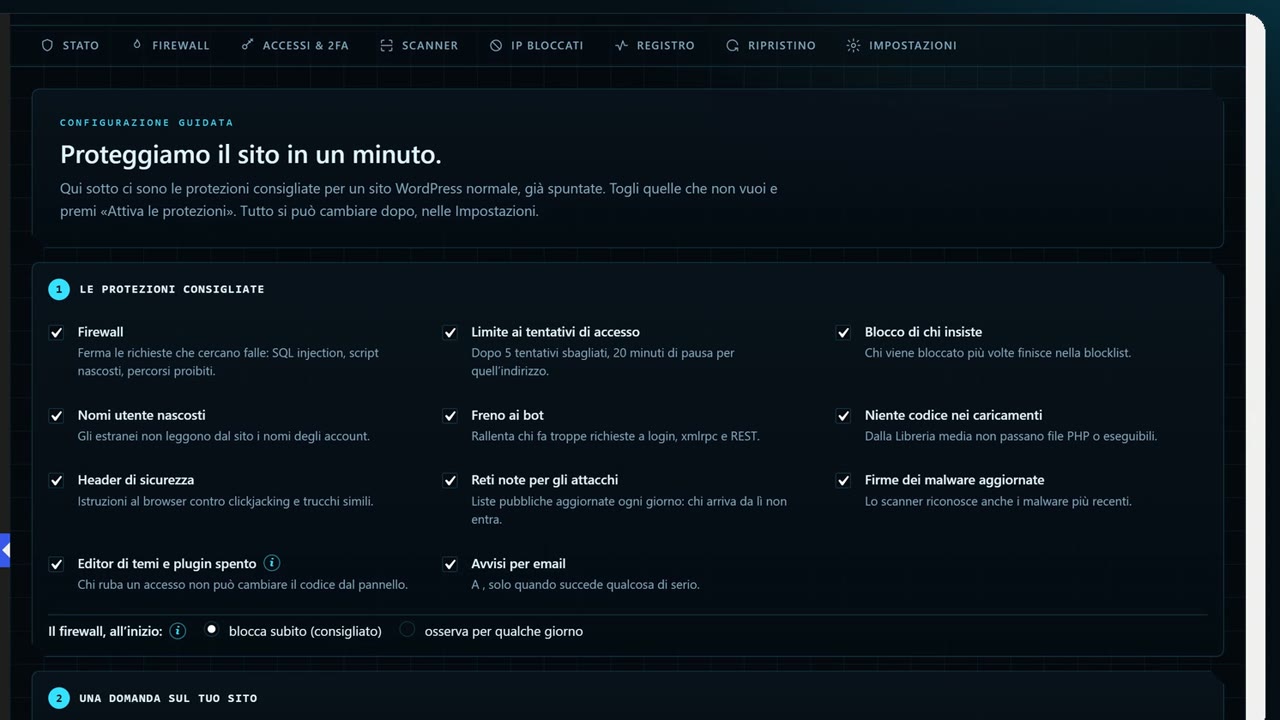
The guided setup. Your site protected on first launch, even if you are not in the trade. On-screen text in Italian.
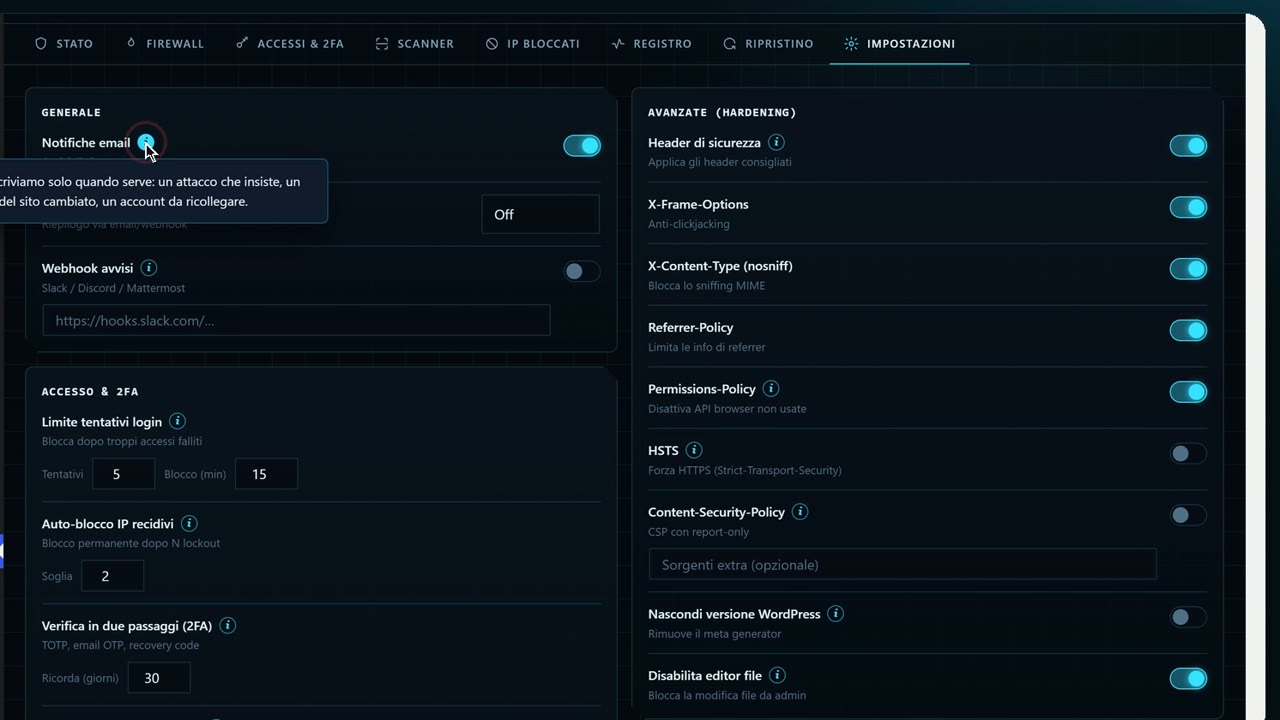
Two-step verification and settings. The code from your phone, alerts, the firewall and the scanner. On-screen text in Italian.
What is OLOsecurity
OLOsecurity is OLOtheme’s security plugin: firewall, logins with two-step verification, scanner and guided recovery in a single panel with eight tabs. It is always included in OLObuild, even in the free edition.
The basic choice: everything on your own server. No cloud, no account, no telemetry; the panel’s scripts, styles and fonts live inside the plugin. Apart from the official wordpress.org checksums, every external service (address lists, malware signatures, vulnerabilities, reCAPTCHA) is switched on only if you choose it.
GPL code — you can read it line by line. The admin speaks Italian and thirteen other languages.
The guided setup
The first time you open OLOsecurity, the guided setup starts by itself: a page with the protections recommended for a normal WordPress site, already ticked.
- The protections: firewall, login attempt limit (5 attempts, then a 20-minute pause), blocking of repeat offenders, hidden usernames, bot throttling, no code in uploads, security headers, lists of dangerous addresses, up-to-date malware signatures, theme and plugin editor off, email alerts. Untick the ones you don’t want.
- One question: do you use apps or services that log in to the site from outside, such as the WordPress app, Jetpack or Zapier? If you don’t, XML-RPC and application passwords are closed; if you don’t know, they stay open with bot throttling.
- Two-step verification: the setup suggests making it mandatory for administrators only if yours is already active, so you never lock yourself out.
Press “Activate protections” and the first scan starts too. The setup is always at hand from the Status tab, and everything can be changed later in Settings.
Status and tips
- Status: the protection score, the last scan and a card for firewall, logins, scanner, core integrity, IP reputation and vulnerabilities, each with its own status.
- Tips for you: the simple things still missing (two-step verification for your account, email alerts, a firewall that only watches, the login limit, executable uploads, IP lists switched off), each with a button that changes only that setting.
- Automatic scans: if the daily check falls hours behind or the last scan is more than three days old, Status says so, explains why (for example
DISABLE_WP_CRONwithout a server cron, or too few visits) and gives you the exact line to pass to your hosting provider. - The (i) buttons: next to the most delicate settings and sections, one click opens a short explanation.
Firewall · mini-WAF
- Rules from the OWASP Core Rule Set: SQL injection, XSS, path traversal, LFI/RCE, bots and null bytes, switched on family by family, with a list of exceptions against false alarms.
- Three modes: off, Monitoring (logs without stopping anyone) or Block (answers 403).
- Per-address request limit: 429 on the risky endpoints, that is xmlrpc, login, REST and
?author=N. - IP reputation: public lists of dangerous addresses, from the sources you choose.
- Geo-blocking: block the countries you list or allow only those, for IPv4 and IPv6, with no paid database.
- Advanced rules: blocking by User-Agent, Referrer or Hostname, beyond address and country.
- Fake crawlers: anyone posing as Googlebot or Bingbot is unmasked with a DNS check (FCrDNS).
- Trusted proxies:
X-Forwarded-ForandCF-Connecting-IPcount only from Cloudflare, local networks and the proxies you list: nobody can fake their own address to dodge a block.
Access & 2FA
- Limited attempts: by default 5 wrong attempts, then a 15-minute wait for that address; after two lockouts within 24 hours the address goes on the blocklist.
- Address lists: the permanent blocklist (403 on the whole site, whole networks included) and the allowlist of trusted addresses, which are never blocked.
- Hidden usernames: no
?author=Nand no user list from REST for anyone not logged in. - Two-step verification: a code from an app (with the QR code) or by email, single-use recovery codes, “remember this browser” for 30 days and, if you want, a requirement for administrators.
- Compromised passwords: the Have I Been Pwned check sends only the first 5 characters of the SHA-1 fingerprint, so the password never leaves the site.
- reCAPTCHA v2 and v3: on login, registration and password recovery, with your own keys.
Scanner · integrity and malware
- Core integrity: comparing against the official wordpress.org checksums finds PHP files that are changed, missing or foreign in wp-admin and wp-includes, and shows the official file next to the modified one.
- Plugins and themes: one fingerprint per component, tied to its version. Files changed without an update are the typical sign of an intrusion.
- Webshells: in uploads and mu-plugins it looks for executable PHP, masked double extensions (
.jpg.php) and known signatures, with the path and the reason. - Deep scan: the whole wp-content folder, to find even what was there before the plugin was installed. It works in chunks and resumes where it stopped on hosts that cut off long requests.
- Optional: the database check (posts, options, comments), the open signatures of Linux Malware Detect and InterServer, phishing links in your content, known vulnerabilities of the installed plugins and themes.
- Exposed files and permissions: wp-config copies, SQL dumps, .env, .git and logs reachable from outside, with the .htaccess rules to add; files and folders anyone can write to.
- Your own rules: add your own signatures and exclude the paths you know.
The scanner works on its own every day. You run “Full scan” whenever you want; the other checks sit under “Other checks”.
Guided recovery
OLOsecurity finds and reports, then walks you through the repair with WordPress’s own tools: to stay safe and portable it never writes or deletes executable files outside the uploads folder.
- Urgent actions, with one click: end all sessions (including the browsers trusted by two-step verification), revoke application passwords, require a new password at next login, remove orphan cron jobs.
- The core: if a file has changed, it takes you to reinstall the current WordPress version from Dashboard › Updates.
- Plugins and themes: it tells you to update them, or to remove them and reinstall them from the official source.
- Suspicious files: the list with path and reason, to remove with your hosting File Manager or via FTP.
- Security keys: changing the salts is guided, step by step.
- The incident report: a document to download and hand over.
Log and alerts
- The log: who, what, when. Logins, users and roles, plugins and themes, critical options, OLOsecurity’s own actions; you can filter it, export it as CSV, and it is kept for 90 days.
- Live traffic: logins, blocks and recognised attacks as they happen, on the Status tab, without writing a log entry for every request.
- Alerts: by email and via webhook on Slack, Discord or Mattermost, only for serious events.
- The summary: if you want it, every week or every month in your inbox.
Settings and hardening
- A single page: the settings split by topic over two columns, each with its own (i). A bar at the bottom reminds you of changes to save and asks before you leave the page.
- Security headers: HSTS included, and the Content Security Policy in report-only mode, with violation collection.
- Hardening: WordPress version hidden, XML-RPC off, file editor off, no PHP in uploads.
- Configuration monitor: hijacked siteurl and home, new administrators, open registration, suspicious cron jobs.
- Export and import: the settings in a JSON file, to copy onto another site.
Spec sheet
- Type
- WordPress security plugin · one panel with eight tabs
- Requirements
- 1.3.0 · guided setup on first launch
- Processing
- WordPress 5.9 or newer (tested up to 7.1) · PHP 7.4+
- Elaborazione
- All on your own server · no cloud, account or telemetry
- Access
- Mini-WAF with OWASP rules · Monitoring or Block · request limit · IPv4/IPv6 geo-blocking · User-Agent, Referrer and Hostname rules
- Accessi
- Limited attempts and blocklist · 2FA by app or email · recovery codes · Have I Been Pwned · reCAPTCHA v2/v3
- Performance
- wordpress.org checksums · plugin and theme fingerprints · webshells · chunked deep scan · database
- Optional sources
- IP lists (Spamhaus, DShield, blocklist.de, Feodo Tracker, FireHOL, IPsum) · Linux Malware Detect and InterServer signatures · OpenPhish and URLhaus · wpvulnerability.net · IPdeny
- Recovery
- Guided · sessions, application passwords, passwords, orphan cron jobs · incident report
- Register
- Who, what, when · CSV export · 90 days · email and webhook alerts
- License
- Italian and 13 other languages in the admin
- Licenza
- GPLv2 or later · always included in OLObuild, even in the free edition